Desktop client for Firestore, Auth and Storage
A Firestore GUI to see, query and change your data
Firestore Studio is a Firestore desktop client and admin tool for Windows, macOS and Linux. A data grid for every collection, a visual query builder, bulk operations that run in the background, and an audit log that can put a change back.
Your project data goes straight from your computer to Google.
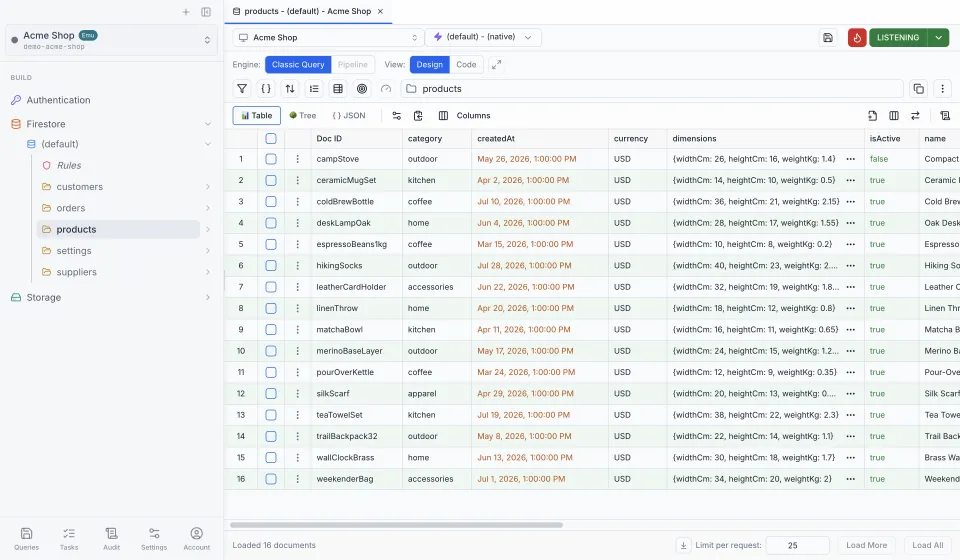


- Query builder
- Bulk operations
- Auth users
- Cloud Storage
- Rules
- Audit & restore
Connect
Use your Firebase CLI login or Google account, paste a service account key, or point at a local emulator.
Explore and query
Open collections in tabs, filter and sort with the builder, and save the queries you use again.
Change with a safety net
Edit one document or a million. Long work runs as a task, and the audit log remembers the value before.
A tour
One app for the whole project
Firestore, Authentication and Storage, with the tools the console does not have.
Your collections as a real data grid
Open any collection, subcollection or collection group in a tab. Columns are your fields; maps, arrays, references, timestamps and geopoints each get a readable cell.
- Table, Tree and JSON views of the same result
- Resize, reorder, hide and colour columns per collection
- Realtime listener or one-shot loads, your choice per tab
Everything in the box
All the features, at a glance
Firestore
Visual query builder
Filters, AND/OR groups, sorts, offset, field selection and nearest-vector search.
Pipeline queries
Stage-by-stage pipelines on Enterprise databases, as rows or as code.
Count, sum, average
Aggregate a query without loading its documents.
Design and Code views
The same query as builder rows or as SDK code you can edit.
Collections and subcollections
A tree of every database, with collection-group queries.
Table, Tree and JSON
Three views of one result, with typed cell viewers.
Typed document editor
Maps, arrays, references, geopoints, timestamps and 64-bit integers.
Bulk update and delete
For selected rows, a query result or a whole collection.
Column operations
Add, rename or delete a field across many documents.
Copy and move
Documents and collections, across projects and databases.
Export and import
JSON out and back in, with a choice on conflicts.
Document compare
See the difference between two documents field by field.
Saved queries
Keep queries in folders and reopen them in a tab.
Geopoints on a map
Plot the geopoint fields of a document or a result.
Realtime or on demand
Listen for changes, or load pages when you ask.
Auth, Storage and operations
Authentication users
Search, create, edit, disable and delete; import, export and transfer.
Custom claims
Read and edit a user's claims as JSON.
Cloud Storage explorer
Folders, previews, metadata, download URLs and transfers.
Security rules editor
Edit, validate and publish Firestore and Storage rules.
Backups and point-in-time
Backup schedules, restore, and a view of your data at a past time.
Background tasks
Progress, pause, resume, cancel and a result per record.
Local audit log
What changed, where, with the value before and after.
Restore a change
Put back the earlier value from an audit entry.
Four ways to connect
Firebase CLI login, Google account, service account or local emulator.
Windows, macOS and Linux
A desktop app with update notices.
Local first
Your data stays between you and Google
Your credentials stay with you
Service account keys and emulator settings are kept in an encrypted file on your computer.
No server in the middle
The app talks to your Firebase projects directly. Your documents, users and files do not pass through ours.
A real desktop app
Windows, macOS and Linux. Queue and audit data live in local files that you can export or purge.
Documentation
Learn the app in an afternoon
73 short articles, from the first connection to restoring a change.
Questions
Frequently asked
Try it on your own project
Download the app, connect a project or an emulator, and open your first collection.